A Deeper Dive into GitHub Spec-Kit - Learning from Initial Missteps

Reviewing What Went Wrong
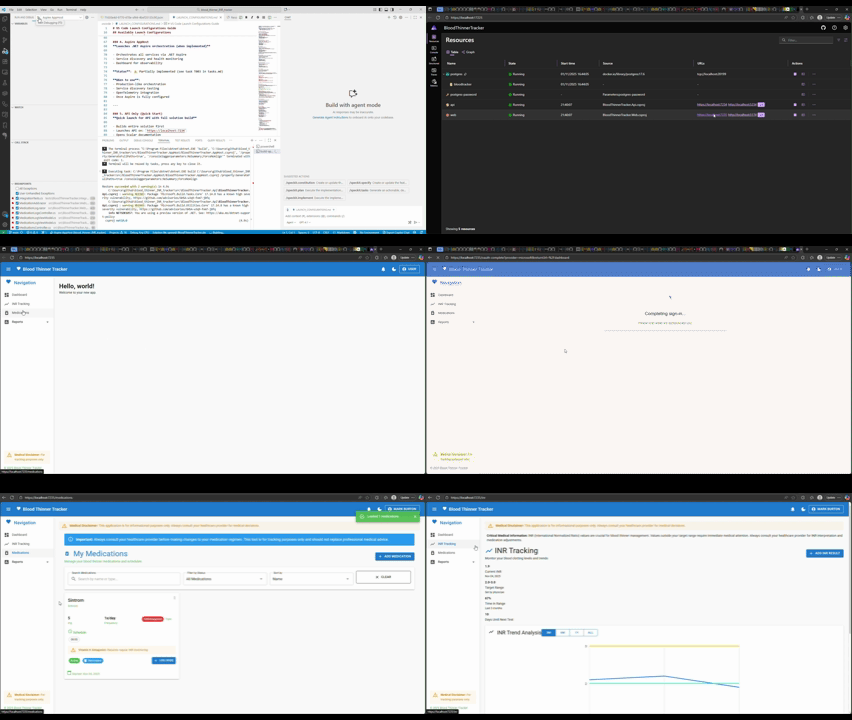
After my first adventures with GitHub spec-kit, I was left pretty disappointed with the results. The structure and architecture looked fine on the surface, but the actual implementation was mostly placeholders. Tasks were marked as complete when they clearly weren’t, and authentication that was supposed to use Azure AD and Google was just accepting any username and password. Not good enough.
Since starting this experiment, I’ve switched to Claude Sonnet 4.5, which is a big step up from the previous model. With better prompts and a more capable LLM, I wanted to dig into why things went wrong the first time—and, more importantly, how to avoid those mistakes in future.
The Revelation: Tasks Marked Complete That Were Not
Upon reviewing the project with fresh eyes (and a proper screen, thank goodness), I discovered numerous tasks cheerfully marked as complete that were, in fact, barely started. Consider these examples from the tasks.md file:
- [x] T010 [P] Implement authentication abstraction and OAuth2 integration (Azure AD, Google)
- [x] T011 [P] Add JWT token issuance and validation middleware
Both proudly displaying their completion checkmarks, yet both thoroughly incomplete. The authentication system was accepting any credentials without validation, and the JWT middleware was issuing tokens for entirely fictional users. Most vexing!
Challenging Copilot's Assessment
When I rather pointedly enquired whether T010 and T011 were genuinely complete, Copilot had the good grace to admit its error:
You're absolutely right! Let me investigate the current authentication implementation and update the documentation to reflect the actual requirements.
What followed was rather illuminating. Copilot conducted a comprehensive analysis and created several subtasks to ensure proper implementation. The tasks were restructured thusly:
- [ ] T010 [P] Implement authentication abstraction and OAuth2 integration (Azure AD, Google)
  <!-- INCOMPLETE: OAuth2 middleware configured but not wired up.
       Currently accepts any email/password and returns JWT without authentication.
       See docs/OAUTH_GAP_ANALYSIS.md -->
  - [x] T010a Add OAuth2 middleware configuration (Google, Azure AD)
  - [ ] T010b **MERGED WITH T015b** - OAuth2 initiation endpoints
  - [ ] T010c **MERGED WITH T015c** - OAuth2 callback handlers
  - [ ] T010d Implement ID token validation service for mobile OAuth flows
  - [ ] T010e Create ExternalLoginRequest model (remove password-based LoginRequest)
  - [ ] T010f Update AuthenticationService.AuthenticateExternalAsync() with real validation
  - [ ] T010g Add database migration for User entity with external auth fields

- [ ] T011 [P] Add JWT token issuance and validation middleware
  <!-- INCOMPLETE: JWT middleware works but issues tokens for fake users.
       Must connect to real OAuth2 flow. -->
  - [x] T011a Implement JwtTokenService token generation methods
  - [x] T011b Add JWT Bearer authentication middleware
  - [ ] T011c Connect JWT generation to OAuth2-authenticated users
  - [ ] T011d Add refresh token persistence
  - [ ] T011e Implement token revocation endpoint
Now this is far more honest! The subtasks clearly delineate what's actually been accomplished versus what remains to be done.
Discovering the /speckit.analyze Command
The truly splendid discovery was the /speckit.analyze command. This command, rather brilliantly, performs a comprehensive analysis of your spec, plan, and tasks to identify issues. The prompt it generates is simply "Follow instructions in [speckit.analyze.prompt.md]", but examining the actual template reveals a most sophisticated approach.
The Analysis Process
The analyze command performs several detection passes, wisely limiting itself to 50 findings to maintain token efficiency:
A. Duplication Detection
- Identifies near-duplicate requirements
- Marks lower-quality phrasing for consolidation
B. Ambiguity Detection
- Flags vague adjectives (fast, scalable, secure, intuitive, robust) lacking measurable criteria
- Identifies unresolved placeholders (TODO, TKTK, ???, etc.)
C. Underspecification
- Requirements with verbs but missing objects or measurable outcomes
- User stories missing acceptance criteria
- Tasks referencing undefined components
D. Constitution Alignment
- Requirements conflicting with constitutional principles
- Missing mandated sections or quality gates
E. Coverage Gaps
- Requirements with zero associated tasks
- Tasks with no mapped requirements
- Non-functional requirements not reflected in tasks
The Analysis Results: A Reality Check
When I ran /speckit.analyze on my blood thinner tracker project, the results were... sobering. The findings were organised by severity and presented in a most comprehensive table:
| ID | Category | Severity | Location(s) | Summary | Recommendation |
|---|---|---|---|---|---|
| C1 | Constitution | CRITICAL | tasks.md:T010-T015 | OAuth2 implementation violates Constitution V (Security) - middleware configured but not wired | Complete T010a-g, T011c-e, T015a-f per OAUTH_GAP_ANALYSIS.md |
| C2 | Constitution | CRITICAL | tasks.md:T003 | Aspire implementation violates Constitution IV (Performance) - placeholder projects without Aspire.Hosting SDK | Complete T003a-e to add Aspire.Hosting SDK |
| C3 | Constitution | CRITICAL | tasks.md:T018 | Blazor Web violates Constitution III (UX Consistency) - UI shells exist but no API integration | Complete T018b-l to connect UI to API endpoints |
| A1 | Ambiguity | HIGH | spec.md:L26 | User Story 1 doesn't specify web vs mobile flows | Clarify redirect flow vs ID token exchange |
| A2 | Ambiguity | HIGH | spec.md:L106-L107 | FR-001 doesn't specify authentication method | Explicitly reference OAuth2 providers |
Critical Violations Found: 3 Constitution Principles Violated
The analysis identified three critical violations of the project's constitutional principles:
Principle V (Security & OWASP Compliance) - OAuth2 Authentication
Finding: C1 - Authentication accepts any credentials without validation
Current State: LoginRequest model has Password field (incorrect for OAuth2), AuthenticationService creates fake users
Required Action: Remove password authentication, implement OAuth2 web redirect and mobile ID token flows
Tasks: T010a-g, T011c-e, T015a-f
Documentation: docs/OAUTH_GAP_ANALYSIS.md, docs/OAUTH_FLOW_REFERENCE.md
Principle IV (Performance) - Aspire Infrastructure
Finding: C2 - Aspire "implementation" was merely placeholder projects
Current State: No Aspire.Hosting SDK, no service discovery, no dashboard, no OpenTelemetry
Required Action: Properly implement Aspire orchestration
Principle III (UX Consistency) - Blazor Web
Finding: C3 - UI shells exist but functionality does not
Current State: Broken navigation, hardcoded data, no API integration
Required Action: Connect UI to actual API endpoints
Understanding the Metrics
The analysis provided some rather revealing metrics:
- Total Requirements: 15 functional requirements
- Total Tasks: 47 main tasks + 39 subtasks = 86 total tasks
- Coverage: 100% (all requirements have tasks, at least on paper)
- Ambiguity Count: 2 HIGH findings
- Duplication Count: 2 findings
- Critical Issues: 3 constitution violations
- High Priority Issues: 12 findings
- Completion Status: ~40% actual completion vs ~60% originally marked
That last metric rather tells the tale, doesn't it? Nearly a third of the supposedly completed work was, in fact, incomplete!
The Recommendation
The analyze command's recommendation was most emphatic:
RESOLVE CRITICAL ISSUES (C1-C3) before proceeding with new feature development. Current implementation has security, infrastructure, and UX gaps that contradict constitutional principles. However, the specification itself is well-structured and comprehensive - the gaps are in implementation fidelity, not design quality.
This is precisely the sort of feedback one needs! The spec and plan were sound; the implementation was the problem. The analysis correctly identified that I shouldn't be adding new features whilst the foundation was fundamentally flawed.
Lessons Learned: Verification and Iteration
This deeper dive into spec-kit has proven most educational:
1. Never Trust, Always Verify
When Copilot marks tasks as complete, one must verify the actual implementation. Visual confirmation in chat is not sufficient. The code must be examined, run, and tested properly.
2. Use /speckit.analyze Regularly
Running the analyze command periodically during development would have caught these issues far earlier. It's not merely a one-time check at the end - it's an iterative tool for maintaining quality throughout development.
3. Subtasks Are Your Friend
Breaking down large tasks into specific subtasks makes verification far easier. Instead of "Implement OAuth2 integration" (which sounds complete but isn't), having discrete subtasks like "Add OAuth2 middleware configuration", "Implement token validation service", and "Wire up callback handlers" makes progress and completeness far more transparent.
4. Documentation of Gaps Is Invaluable
The OAUTH_GAP_ANALYSIS.md file that Copilot created was exceptionally useful. Having a written record of precisely what's wrong and what needs to be done prevents confusion and provides a clear roadmap for remediation.
5. Constitutional Principles Matter
Creating a proper constitution for the project wasn't merely a box-ticking exercise. The analyze command uses these principles to identify when implementations violate core requirements. Security, performance, and UX consistency weren't just nice-to-haves - they were constitutional mandates that the implementation failed to meet.
6. Claude Sonnet 4.5 Is Noticeably Better
The improvement from Claude 4 to 4.5 is considerable. The analysis was more thorough, the recommendations more actionable, and the ability to understand context and identify problems significantly enhanced. Enabling the newer model was undoubtedly worthwhile.
Moving Forward: A Proper Implementation
Armed with these insights, I now have a clear path forward:
- Address Critical Violations First - Fix the OAuth2 implementation, properly implement Aspire, and connect the Blazor UI to the API
- Run /speckit.analyze Regularly - After each significant implementation session, verify that no new violations have been introduced
- Maintain Honest Task Status - Only mark tasks as complete when they're actually complete, not merely when placeholder code exists
- Document Issues Thoroughly - Create gap analysis documents when problems are identified
- Iterate and Verify - Small iterations with frequent verification beats large implementations with belated testing
The /speckit.checklist Command: A Different Perspective
Whilst the /speckit.analyze command proved most illuminating, I subsequently discovered that spec-kit offers another command that provides a rather different perspective: /speckit.checklist. This command also expands to "Follow instructions in [speckit.analyze.prompt.md]", but examining the checklist.md template reveals a fundamentally different approach.
Checklists as Unit Tests for Requirements
The checklist prompt introduces a most intriguing concept:
CRITICAL CONCEPT: Checklists are UNIT TESTS FOR REQUIREMENTS WRITING - they validate the quality, clarity, and completeness of requirements in a given domain.
Rather than merely identifying problems (as analyze does), the checklist command generates specific validation questions such as:
- "Are visual hierarchy requirements defined for all card types?" (completeness)
- "Is 'prominent display' quantified with specific sizing/positioning?" (clarity)
- "Are hover state requirements consistent across all interactive elements?" (consistency)
- "Are accessibility requirements defined for keyboard navigation?" (coverage)
- "Does the spec define what happens when logo image fails to load?" (edge cases)
The Interactive Assessment
What's particularly splendid about this command is its interactive nature. Before generating the checklist, Copilot asked me to prioritise focus areas:
| Option | Focus Area | Why It Matters |
|---|---|---|
| A | Medical Safety Requirements | Critical healthcare domain - medication timing, INR validation, safety warnings |
| B | OAuth2 Authentication Requirements | Recently remediated CRITICAL issue - ensure all auth requirements are complete |
| C | Cross-Platform Consistency Requirements | Multi-platform app - verify requirements consistency |
| D | All Critical Paths | Comprehensive review covering safety, auth, and platform consistency |
| E | Implementation Readiness | Focus on verifying requirements are sufficiently detailed for immediate implementation |
I selected Option E - Implementation Readiness for stakeholder sign-off, with particular emphasis on timezone/DST edge cases.
A Rather Sobering Discovery
Here's where things became most interesting. Whilst the /speckit.analyze command had concluded:
Post-Remediation Analysis Complete ✅
Status: VALIDATION SUCCESSFUL
Recommendation: ✅ PROCEED WITH IMPLEMENTATION
Estimated Timeline: 3-4 weeks for full feature completion
The /speckit.checklist command found 154 validation checkpoints requiring attention! The summary was rather different:
📋 Checklist Created
File: requirements.md
Total Items: 154 validation checkpoints
Purpose: Implementation readiness review - Verify all requirements are complete, clear, measurable, and ready for development
These 154 items were written to requirements.md and, most critically, became a blocker to further implementation. When I attempted to run /speckit.implement, it performed a prerequisite check and discovered:
📊 Checklist Status Report
Checklist          Total  Completed  Incomplete  Status
requirements.md    154    0          154         ✗ FAIL

Overall Status: ✗ FAIL - All checklist items are incomplete
Implementation was blocked until these checklist items were addressed. Quite a different conclusion from "proceed with implementation"!
Addressing the Checklist: A Practical Framework
Copilot provided a most sensible decision framework for addressing each checklist item:
For each unchecked item, ask:
-
Is this already in my spec?
- YES → Check the box ✓
- NO → Go to question 2
-
Is this critical for MVP?
- YES → Add to spec.md, then check box ✓
- NO → Document as "Deferred to v2.0" and check box ✓
-
Is this an assumption I'm accepting?
- YES → Document in "Assumptions" section, check box ✓
Worked Examples
CHK022 - "Are timezone detection requirements specified (device location vs manual selection)? [Gap]"
To complete this:
- Open spec.md
- Find FR-016 (timezone requirements)
- Add clarity: "System shall detect device timezone automatically; users may override manually"
- Mark checkbox:
- [x] CHK022
CHK040 - "Are 'dosage amount' validation rules and supported units explicitly defined? [Gap]"
To complete this:
- Open spec.md
- Find FR-004 (medication logging)
- Add: "Dosage validation: positive decimal numbers, units: mg, mcg, mL, tablets"
- Mark checkbox:
- [x] CHK040
Point-by-Point Review
I requested that Copilot review the gaps systematically. Here's an example of its analysis:
CHK001 Analysis
Question: "Are authentication requirements complete for both web (redirect flow) and mobile (ID token exchange) platforms?"
What I Found in Your Spec:
- ✅ User Story 1 - Acceptance Scenarios 1 & 2 (Lines 25-27): Web redirect flow and mobile ID token exchange explicitly documented
- ✅ FR-001 (Line 103): States "Web applications use OAuth2 redirect flow; mobile applications use platform-native OAuth with ID token exchange"
- ✅ Key Entities - User Account (Lines 130-131): Documents OAuth2 fields, explicitly states "NO password field"
Verdict: COMPLETE ✓
After confirming the first item was indeed complete, I updated requirements.md and checked the box, then requested the next 10 items for review.
The Tension Between Analyze and Checklist
This reveals a most intriguing tension in spec-kit's approach:
/speckit.analyzefocuses on identifying problems, violations, and gaps at a high level/speckit.checklistfocuses on granular validation of requirements quality and completeness
The analyze command might declare you ready to proceed, whilst the checklist command discovers 154 specific points requiring validation. Both are valuable, but they serve rather different purposes. The analyze command ensures your architecture and approach are sound; the checklist command ensures every detail is properly specified and ready for implementation.
Conclusion: Spec-Kit Redeemed
My initial disappointment with spec-kit was, I must confess, largely due to my own failure to properly verify the implementation. The /speckit.analyze command has proven to be precisely the tool needed to maintain quality and honesty in AI-assisted development, whilst the /speckit.checklist command provides the granular validation necessary to ensure implementation readiness.
Spec-kit, when used properly with regular verification, the analyze command, and comprehensive checklists, is indeed a splendid approach to structured software development. The framework is sound; the implementation oversight is critical. One cannot simply trust that AI-generated code is complete and correct - one must verify, analyze, checklist, and iterate until it genuinely meets the specification.
And crucially, one must ensure that tasks marked as complete are actually, properly, thoroughly complete - not merely structurally present with placeholder implementations!